
Payhip is one of the simplest ways to start selling ebooks, templates, courses, memberships or coaching online. It’s based in London, and its pitch is refreshingly plain: every plan gets every feature, including the free one. You only choose how you pay, either a higher transaction fee and no subscription, or a monthly fee and a lower cut.
For new creators, that’s a great deal. You can open a store, upload products and start selling without paying anything upfront, and Payhip handles EU and UK VAT plus US and Canadian sales tax for you. The trade-offs are design flexibility and scale. It isn’t a full website builder, and big sellers should run the fee math early.
Payhip pricing and when to upgrade
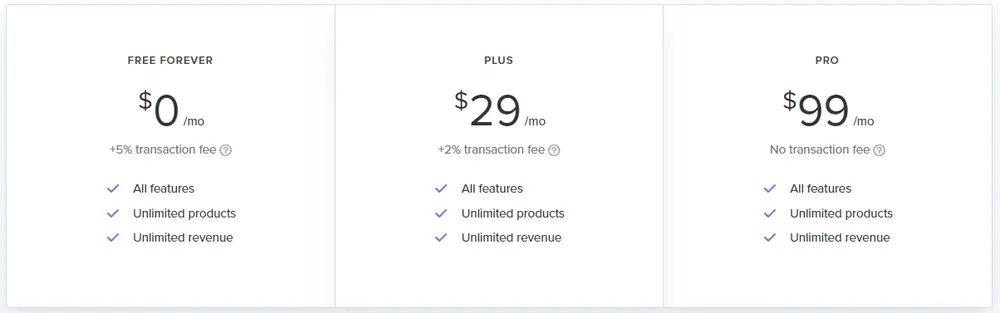
Payhip has three plans. These prices were on payhip.com on October 24, 2026.
| Plan | Monthly fee | Payhip transaction fee | Features |
|---|---|---|---|
| Free Forever | $0 | 5% | All features, unlimited products and revenue |
| Plus | $29/mo | 2% | All features, unlimited products and revenue |
| Pro | $99/mo | 0% | All features, unlimited products and revenue |
PayPal and Stripe still charge their standard processing fees on every plan. Stripe’s published US pricing is the place to check the current card rate.
The break-even points are easy to work out:
- Free to Plus makes sense once you sell more than about $967 a month, because 3% of $967 is $29.
- Plus to Pro pays off above about $3,500 a month, where 2% equals the extra $70.
Below roughly $1,000 a month in sales, stay on Free.
What you keep from a $20 sale
On the Free plan, a $20 ebook sale costs you a $1.00 Payhip fee. Stripe’s standard US card rate of 2.9% plus 30 cents adds about $0.88, so you keep roughly $18.12. On Plus the Payhip fee drops to $0.40, and on Pro it disappears, leaving about $19.12 after Stripe.
Those are small differences on one sale, and big ones at volume. A creator selling 300 copies a month would pay $300 in Payhip fees on Free, $120 plus $29 on Plus, or a flat $99 on Pro.
What you can sell
- Digital downloads such as ebooks, PDFs, templates, presets, music and software, with license keys for software
- Online courses with lessons, drip content and quizzes
- Memberships and subscriptions, including tiered levels
- Coaching and calls with scheduling
- Physical products, with shipping settings
Marketing tools are included on every plan: discount codes, upsells, cross-sells, an affiliate program for your products, email marketing and a “pay what you want” option. Payouts go to your PayPal or Stripe account immediately after each sale.
Taxes handled for you
This is one of Payhip’s most underrated features. Selling digital products to customers in the EU and UK means collecting VAT based on the buyer’s location, which is a headache for a one-person business. Payhip collects, reports and remits EU and UK VAT, plus US and Canadian sales tax, on your behalf. You can add other taxes yourself.
For background, the European Commission’s VAT One Stop Shop portal explains how VAT on digital sales works across the EU. You still need to report your income in your own country.
What users like and dislike
Payhip scored about 4.6 on Trustpilot from more than 550 reviews when we checked. Users praise the ease of setup, the free plan and helpful support. The complaints are fewer, but consistent:
- Limited store design. You can change colors, fonts, collections, checkout branding and add custom CSS, but layout control is basic compared with Shopify or WooCommerce.
- Account reviews or closures, which a small number of sellers report and which can pause sales.
- Support delays at times, since help is mainly by email.
- Payment processor rules, because PayPal and Stripe can hold funds independently of Payhip.
For comparison, Gumroad’s Trustpilot rating was far lower at about 1.4, with complaints about support and locked accounts.
Setting up a store that sells
- Start with one strong product rather than a big catalog.
- Write a clear product page with previews, a table of contents or sample pages.
- Use a launch discount with a coupon code and a deadline.
- Turn on upsells to raise the average order value.
- Recruit affiliates among your fans, who earn a commission you set.
- Collect emails at checkout so you can announce new products.
Payhip won’t bring you buyers on its own, since it isn’t a marketplace with built-in search traffic. Pair it with a social channel that drives traffic. Many creators use Instagram DMs or a newsletter to send buyers to their product pages.
Payhip vs alternatives
| Payhip | Gumroad | Systeme.io | SaleHoo | |
|---|---|---|---|---|
| Main use | Digital products, courses, memberships | Digital products | Funnels, email, courses | Supplier directory for physical goods |
| Free plan | Yes, 5% fee | Yes, 10% fee plus processing | Yes | No |
| Lowest fee option | 0% on Pro at $99/mo | No subscription option | Paid plans | n/a |
| Tax handling | EU/UK VAT and US/Canada sales tax | Handles sales tax | Varies | n/a |
If you want funnels and email automation around your products, our Systeme.io review is the closest all-in-one alternative, and GetResponse covers email. Selling physical products? See SaleHoo for suppliers or Spocket for dropshipping. To drive traffic from social, our ManyChat review explains DM automation. More tools are in our ecommerce reviews.
Who should skip Payhip
Skip it if you need a fully custom website design, if you sell mainly physical products at volume, or if you want an all-in-one funnel and CRM system. The pros and cons are below.
Our verdict on Payhip
Payhip is one of the best low-risk platforms for selling digital products, because every feature is available for free and you only pay a 5% cut until your sales justify a plan. Built-in VAT and sales tax handling saves real admin time. Move to Plus at around $1,000 a month and Pro above $3,500, and the fees stay fair as you grow.
Our review method explains how we research software we haven’t tested hands-on.